Retro Bowl








































Retro Bowl: Just One More Game
Retro Bowl is the sort of game people underestimate. At first glance, it looks like a throwback sports title from another era, complete with chunky pixel graphics and simple menus. Five minutes later, you're debating whether to spend coaching credits on a new player, wondering why your star receiver suddenly forgot how to catch, and promising yourself that the next game will be the last one for the night.
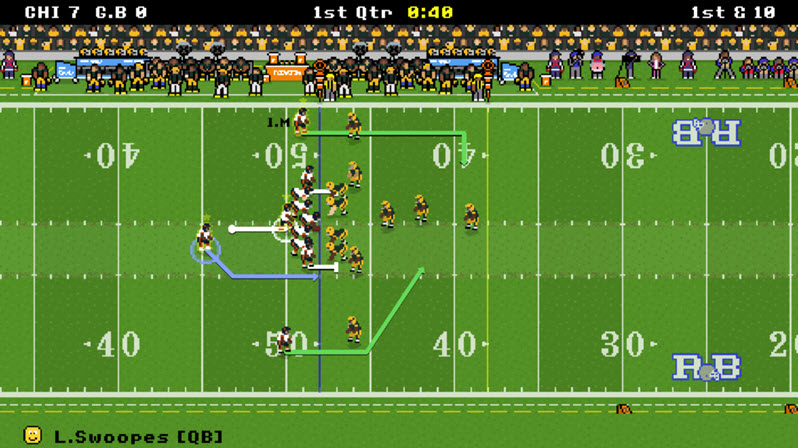
That combination of simplicity and depth is exactly why the game has become so popular. Developed by New Star Games, Retro Bowl offers a mix of football action and team management that feels surprisingly satisfying. Its companion title, Retro Bowl College, takes the same idea and places it in the world of college football. Both games became major hits and even topped the iOS sports charts in October 2023. For browser players, getting started couldn't be easier. There's nothing to install - load the game and start coaching.
The biggest difference between the two versions comes down to the type of team you want to build. Retro Bowl focuses on a professional football organization. You're dealing with roster decisions, upgrades, and the occasional media obligation. Retro Bowl College adds recruiting to the equation. Instead of managing established players, you'll spend time searching for promising young athletes and helping them develop. The college version also includes a detailed uniform editor, which is a surprisingly fun distraction if you enjoy personalizing your team.
How to Play
You are the head coach, but don't worry - you won't need a clipboard. During games, you control the offensive side of the ball while defensive possessions are simulated automatically. Each matchup is played across four quarters, and the objective is exactly what you'd expect: score more points than the other team before the clock hits zero.
Controls
Mouse
- Navigate menus and management screens.
- Select upgrades and team options.
- Aim and release passes.
Keyboard
- W / S: Move up or down.
- A / D: Move left or right.
- Enter: Confirm actions and selections.
The controls are simple enough that most players understand them after a single drive.
What Counts as a Score?
Football fans will recognize the basics right away. A touchdown is worth 6 points and remains the quickest way to build a lead. When you score, you can kick for an extra point or attempt a more risky two-point conversion. The offense is trapped in its own end zone; then a field goal is worth 3 points and a safety is worth 2 points.
Playing well doesn't just put points on the scoreboard - it also rewards coaching credits that can be used to improve different areas of your franchise.
Managing More Than Game Day
One thing that surprises new players is how much happens away from the field. Facilities need upgrades. Players get tired. Morale can rise and fall depending on results. Ignoring those details usually comes back to haunt a team later in the season.
A useful habit is checking player condition regularly. A slightly tired athlete might be fine for one game, but overworking the roster can create bigger problems down the road. In Retro Bowl College, recruiting deserves just as much attention as the games themselves. A good crop of recruits could change all that.
Winning is often a matter of small decisions. Mix in the run and the pass, don’t force throws, and use timeouts when you really need them. Consistently do that, and you give yourself a chance in almost every game.”
Retro Bowl doesn’t have impressive graphics or complex systems to keep players interested. Rather, it shoots for something much harder to pull off: making every season feel like a story worth finishing.