Loop Crash 2







































Loop Crash 2: Traffic Trouble
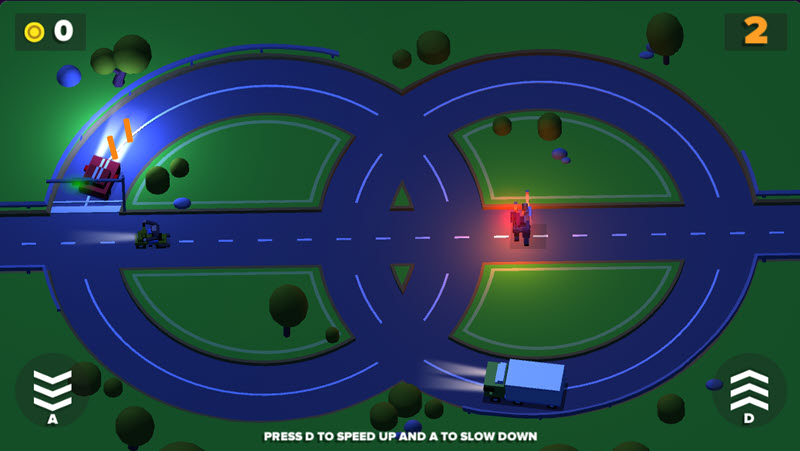
Loop Crash 2 throws you into a tiny traffic nightmare where every lap feels peaceful... until it absolutely isn't. Your car keeps driving around the loop on its own, so the only thing you need to worry about is when to speed up and when to ease off the gas. It sounds simple enough, but after a few laps, the road becomes crowded with vehicles coming from every direction. One wrong move, and your adventure ends with a very dramatic crash.
A Small Road, A Big Challenge
Don't expect a traditional racing game here. There are no finish lines to cross or rivals to overtake. Your goal is to stay on the road for as long as possible while avoiding busy intersections and steering clear of oncoming traffic.
The longer you stay alive, the more traffic there is, and the fewer safe openings there are to slide through. The pressure the game puts on you keeps increasing, and every lap you make it feels rewarding. You’ll collect coins along the way to unlock different cars, and bonus features like the Prize Wheel and Coin Collection help you build up your garage even quicker.
Different track layouts also keep the game feeling fresh. Once you've mastered one circuit, another one is ready to test your timing all over again.
How to Play
Getting started only takes a few seconds, but staying alive is another story.
Your vehicle automatically follows the looping road, so you never have to steer. Instead, pay attention to the traffic crossing ahead. Hold the acceleration control whenever the road is clear, then let go before another vehicle reaches the intersection. Good timing is far more valuable than driving at full speed.
Every completed lap adds more cars to the track, making each decision increasingly important. Keep surviving, collect coins, unlock new vehicles, and see how long you can stay on the road without causing a spectacular pile-up.
Controls
PC
- Up Arrow or Left Mouse Button: Hold to accelerate.
- Release the button: Your car gradually slows down.
Mobile
- Tap and hold: Accelerate.
- Lift your finger: Slow down.
Helpful Tips
Try looking ahead instead of watching only your own car. Spotting traffic early gives you much more time to react. Small taps on the accelerator usually work better than holding it down for too long. If the road looks crowded, waiting an extra second is often the safer choice. If you’re a beginner, you might want to spend some time in Easy mode before you jump to Hard, where traffic is a lot less forgiving.
Final Thoughts
Loop Crash 2 is one of those games that is easy to learn, but surprisingly difficult to master. Every run feels different because traffic never stays comfortable for long. Whether you're unlocking new cars, chasing a higher score, or simply trying to survive one more lap, the game always finds a funny way to tempt you into saying, "One more try!" - right before another perfectly timed crash proves otherwise.